Begin a New Adventures, with oldest Lineage 2 Community!
What's next? You can create game account. Have fun in the forums!
  • https://forum.lineage2dex.com/threads/16500/

Resolution and text and font size problem

HIdeto

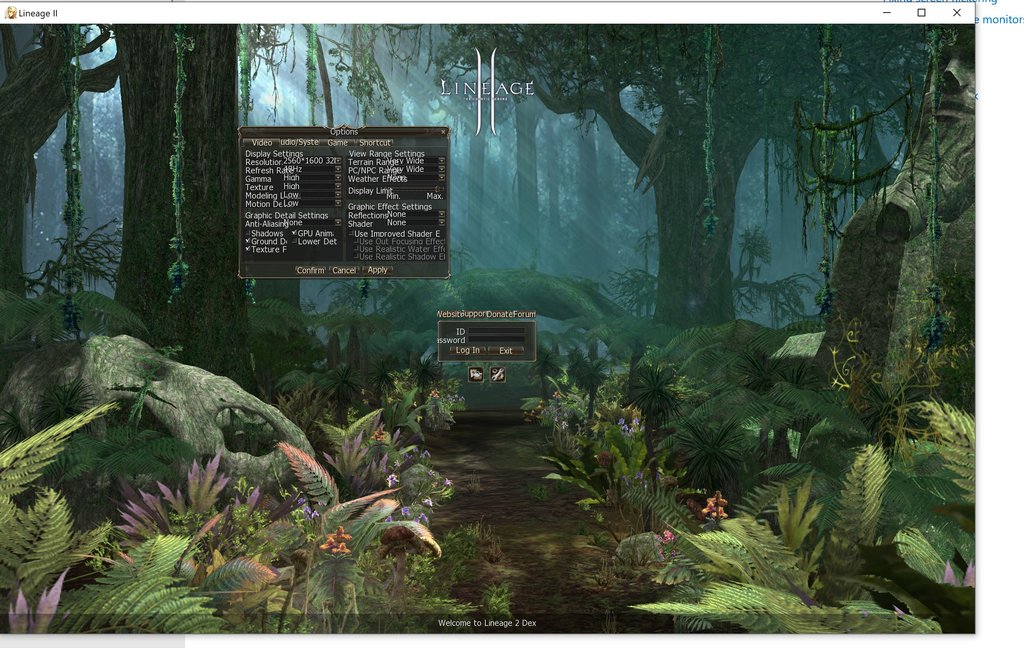
Hi, I've downloaded my client from l2dex website. I play on laptop which has screen in 3000x2000 resolution, on native resolution game has very small text and UI which is normal due to very high res but when i set up 1080p or any other resolution the text cannot fit in brackets which makes the game unplayable. Does anyone has this problem as well ? Do you know how to fix it, i tried looking on google but couldn't find anything useful. Here is a screenshot how does it look like:
 

Attachments

smite

i am still encountering issues with this. changing the font size from windows doesn't work
fault starts if i switch to full screen (even if i revert to window mode). problem was fixable by reinstalling the game, but now not even this fix is working.

I have attached a picture of this looks (unplayable)

please advise
 

Attachments

smite

if someone else encounters this, my problem is caused by the laptop i'm playing, it has a 3000x2000 screen resolution and if the game enters full screen(by accident), fucks everything.

as a solution, play with the "compatibility mode" of the l2.exe
tnx for the help
 

Kazama

Community Helper
if someone else encounters this, my problem is caused by the laptop i'm playing, it has a 3000x2000 screen resolution and if the game enters full screen(by accident), fucks everything.

as a solution, play with the "compatibility mode" of the l2.exe
tnx for the help
Ah... I know solution =) Install drivers for your laptop. Its known problem, when u have high resolution and windows dont know "how to scale" fonts.
Try install drivers for it
 

erttai

Ah... I know solution =) Install drivers for your laptop. Its known problem, when u have high resolution and windows dont know "how to scale" fonts.
Try install drivers for it
Can you please put the link to download the drivers????. Im having the same issue. I just miss clicked at the border of the client and went fullscreen. And now its unplayeable. Thanks
 

Shtembs

Hey all

I had a similar problem, i found a "half fix", to return the icons and windows to "big state". You need to delete some files in register.

Here is the URL to the post: 4K UHD Screen and Lineage not letting you change the screen resolution

I had to navigate to a different file location within the registory edditor to find the right keys, for me they were in the :
"Computer\HKEY_CURRENT_USER\SOFTWARE\Microsoft\Windows NT\CurrentVersion\AppCompatFlags\Layers"

I deleted all the ".bin" files of L2 (they were all from other servers)

Again, this will not decrease the font, but ti will make your windows larger.

I hope it helps.
 

smite

or do this, is what worked for me
1. right click L2.exe (not the updater)
2. go "Compatibility"
3. tick "run in compatibility mode for : Windows 7"
4. click on "run compatibility troubleshooter"
5. on the pop-up window , click "Try recommended settings"
6. click "test the program"
7. ENJOY!!!!
8. to make it "permanent" , in the popup window click "next" and then "yes, save these settings for this program"

problem will reoccur if you switch to full screen again (in my case at least)
 

Facebook

Discord

Members online

No members online now.
Top